
ERPeasy
Enterprise ERP, workflow and approval platform
Organizations running approvals and compliance through email and spreadsheets, at a scale where that has stopped working. Typically 500+ employees or 200+ external partners.
How it works
How a request moves through an ERPeasy approval workflow
- Automated
- Person decides
- Onboarding or KYC request
- Required documents
- Your approval hierarchy
- Approved, compliant record
- Complete audit trail
- Operational dashboards
Request submitted
The request enters at the first step of a workflow definition. Each step has an owner role, required documents, a set of checks and a set of exits, all configured to your process.
Rule-based and automatic, logged in the audit trail.
Documents and rules
The system checks that required documents are attached and in date, matches fields against reference lists and runs the compliance rules for that step. A failed check stops the request and tells the owner why.
Rule-based and automatic, logged in the audit trail.
Routed to the approver
The request moves to the right owner by amount or category, following your hierarchy. Reminders go out when a step sits too long. Access follows the role, so a job change needs no manual re-grant.
Rule-based and automatic, logged in the audit trail.
Approval decision
People handle the judgment: approving the exception, rejecting the request that passes every check but still looks wrong, and signing the steps your policy says a human must sign.
A person makes this call. The system gives them the context.
Logged to audit trail
Who submitted, who approved, what the document was at the time and which rule fired are all recorded. The trail on a request from fourteen months ago is one query.
Rule-based and automatic, logged in the audit trail.
Who it is for
When approvals and compliance outgrow email and spreadsheets
ERPeasy is a configurable enterprise ERP for the operational spine that most ERPs leave to email: onboarding, verification, approvals, documents and roles. It is not a finance ERP and does not replace your general ledger. Your approval hierarchy, document set and compliance rules are configuration, while the engine, access model and audit trail are already written, so a first workflow is typically configured and live in 4–8 weeks.
For a large-scale energy enterprise, a governed onboarding and approval workflow replaced paper KYC over a 24 month program, and platforms of this type cut onboarding time by up to 45%. The same engine ran business travel requests for a large global financial services company, with policy compliance checked inside the flow.
-
Approvals run through email and spreadsheets at enterprise scale
Past 500 employees or 200 external partners, nobody can say quickly who approved what, or why a request has stalled.
-
Your finance ERP leaves operational workflow to email
The general ledger is covered. Who may do what, which documents are required and who signs off are not.
-
A generic workflow tool leaves the enterprise part to you
Roles, delegation, segregation of duties, retention and policy-table checks all have to be built on a blank canvas.
-
A full ERP suite takes eighteen months to configure
The operational processes that hurt today wait behind a year or more of configuration work.
-
Auditors ask for a trail that lives in inboxes
Reconstructing who approved a request fourteen months ago means searching mail and shared drives, if it can be done at all.
The platform
What ERPeasy gives you.
Modules in production, ready to configure
-
KYC and verification workflows
Verification steps with required documents and checks, so a request cannot move on until that step's rules pass.
-
Digital onboarding kits
Structured onboarding for employees and external partners in place of paper packs and email attachments.
-
Role-based access control
Access follows the role in your hierarchy. When a person changes job, their permissions change with them.
-
Document management with audit trail
Documents held against the request as they were at each step, with retention and a full history.
-
Multi-step approval routing
Requests routed to the right approver by amount or category, with reminders when a step sits too long.
-
Policy compliance checks
Rules that reference your policy tables run inside the flow, at the step they apply to, not after it.
-
Logistics integration
Workflow steps connect to your logistics systems as part of the configured integrations.
-
Operational dashboards
Where requests are, which steps are slow and which approvals are waiting on someone.
What is different about ERPeasy
- 01
The enterprise parts are already written
Roles, delegation, segregation of duties, document retention and policy-table checks are built, because every client needed them. Generic workflow tools leave them to you.
- 02
Narrower than an ERP suite, on purpose
ERPeasy does operational workflow and does not replace your general ledger. That is why your hierarchy is mapped in during the first weeks, not the first year.
- 03
Your rules are configuration
The approval chain, document set and compliance rules are configured. The engine, audit trail and access model are the same everywhere and already written.
- 04
Automation for the routine, people for judgment
The system checks documents, dates and reference lists and routes by amount or category. People approve exceptions and sign the steps policy says a human must sign.
Inside the product
ERPeasy, screen by screen.
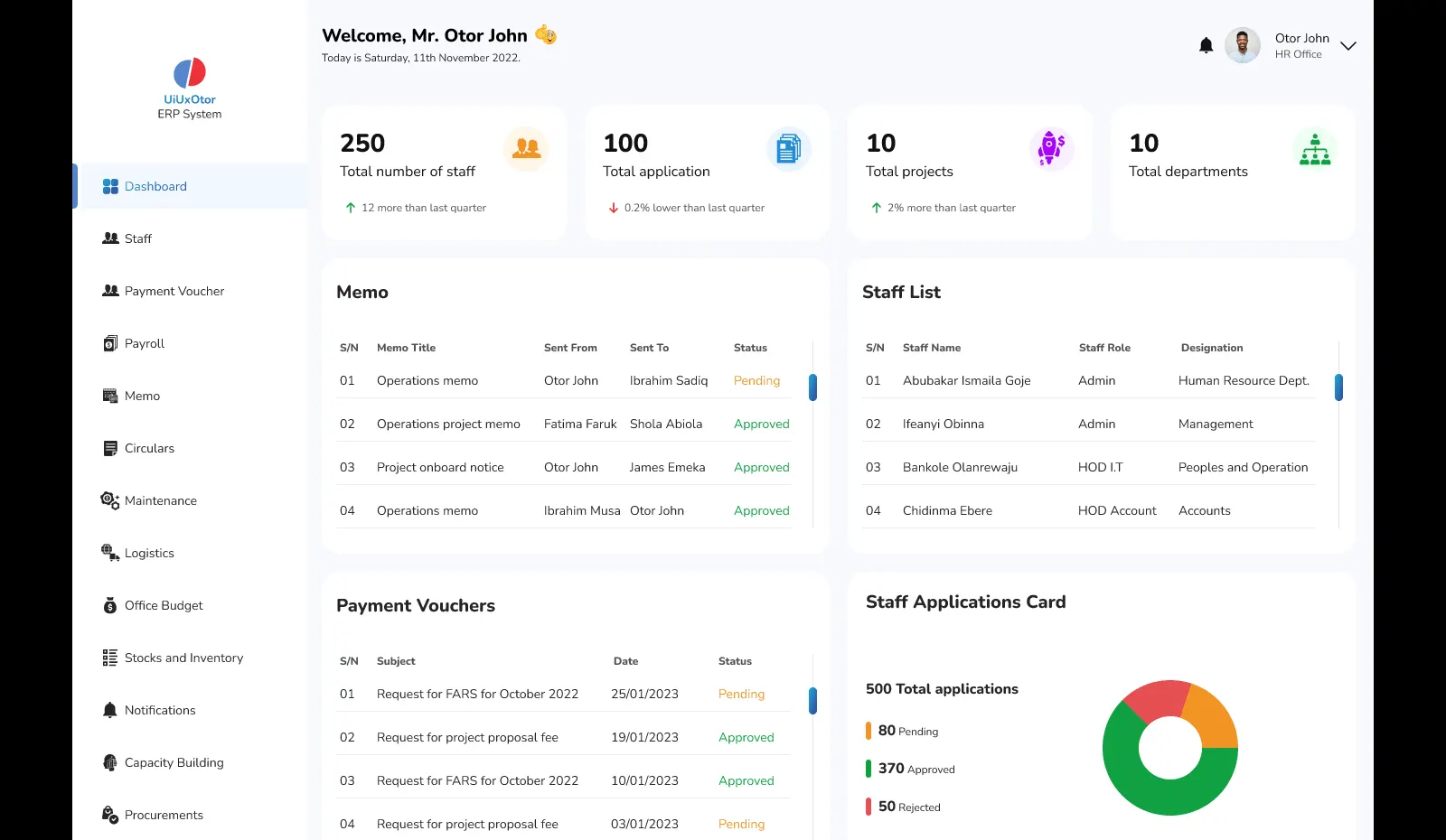
Operations dashboard
One home screen for the whole back office: headcount, applications, projects and departments, with memos and staff lists that need attention today.
- Live counts across departments
- Pending memos and approvals in one place
- Role-based view for each office
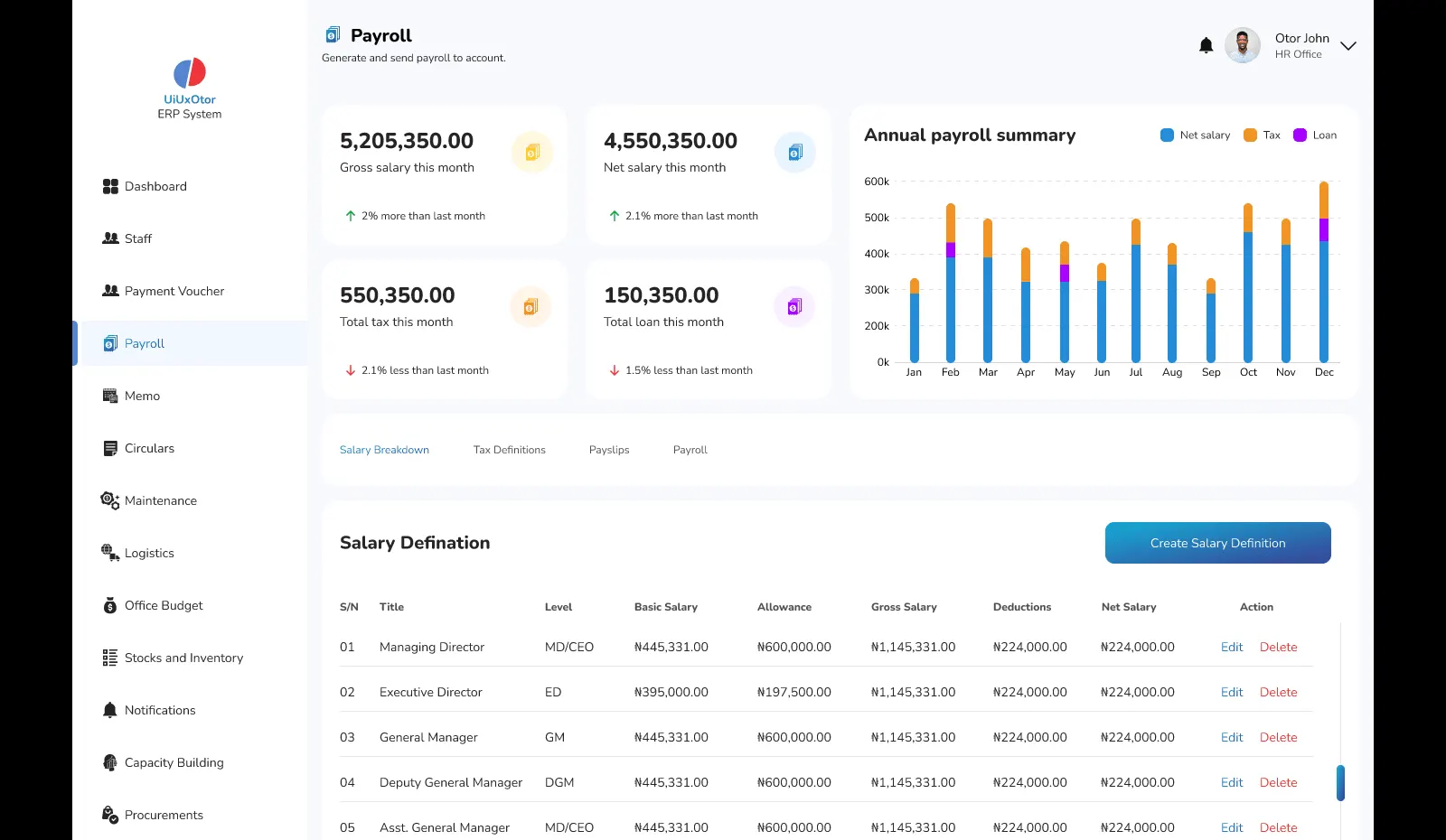
Payroll
Gross and net salary, tax and loans for the month, the annual payroll trend, and salary definitions by level, all in one module.
- Monthly payroll summary and annual trend
- Salary definitions by grade
- Payslips and tax rules on tabs
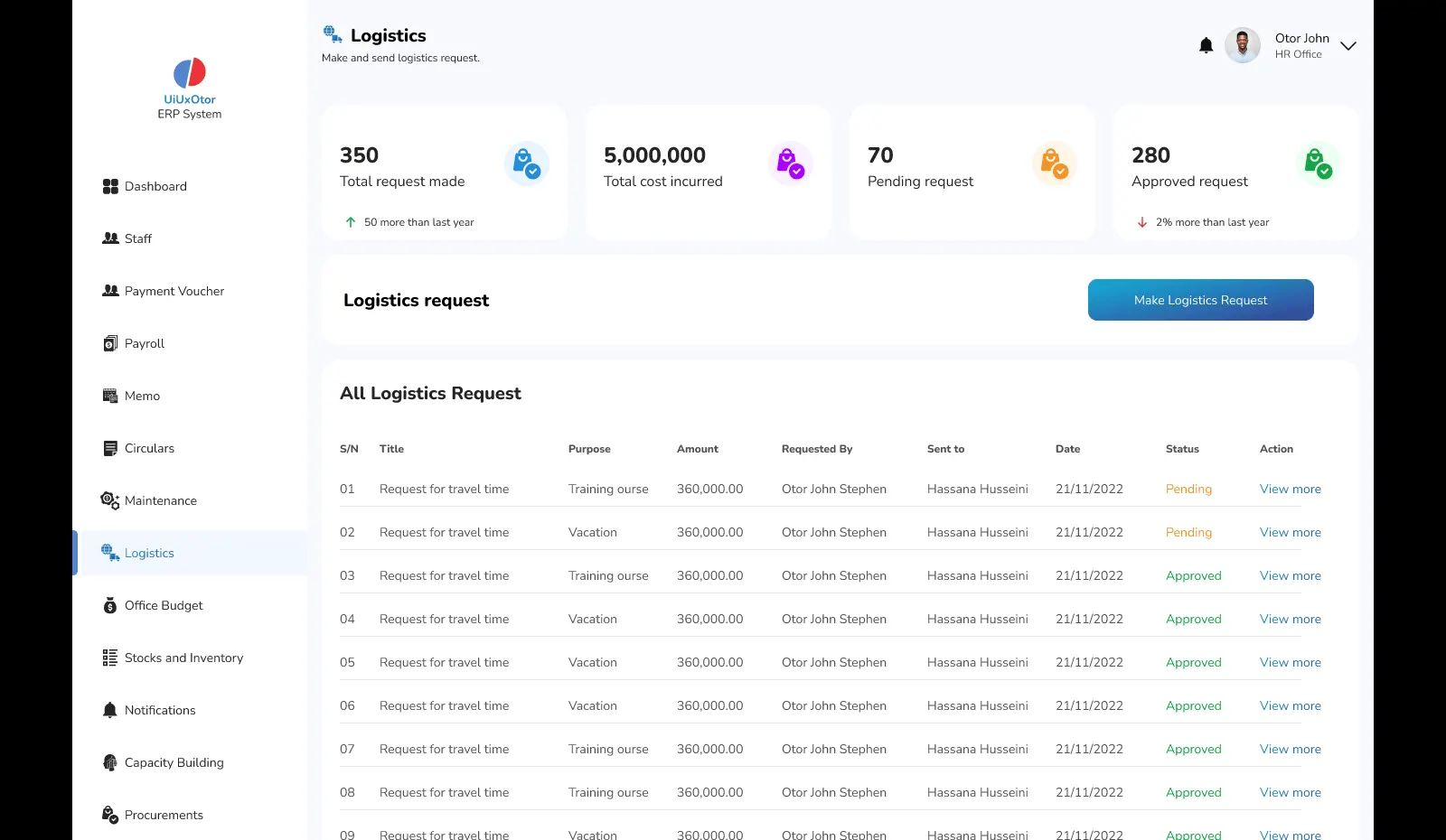
Logistics requests
Travel and logistics requests raised, costed and approved with a status on every line, instead of forms passed around by email.
- Request, cost and approval in one flow
- Pending and approved counts at a glance
- Full history per requester
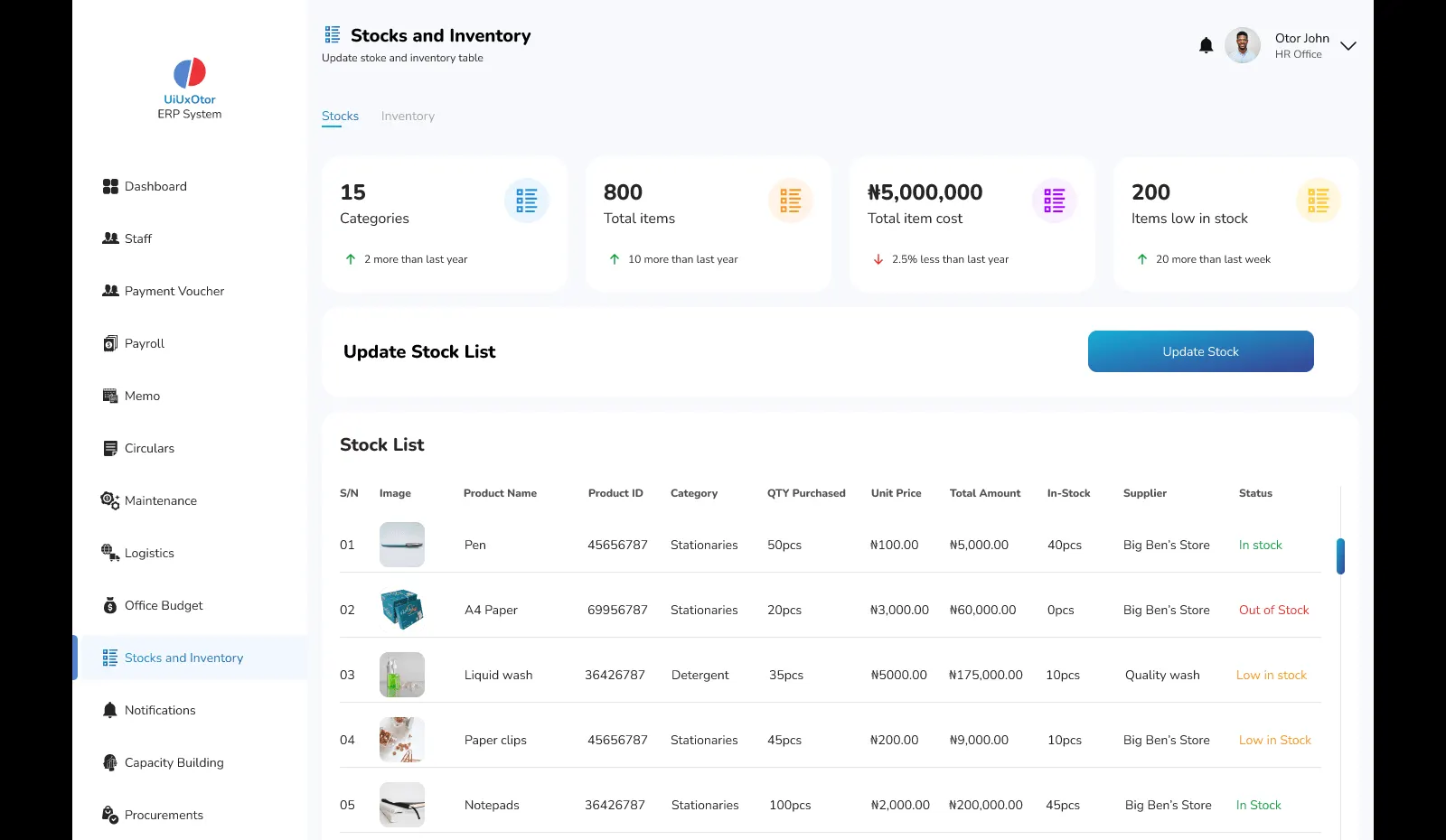
Stocks and inventory
Categories, item counts, stock value and low-stock alerts, with a stock list that shows supplier and status for every product.
- Low-stock items surfaced automatically
- Supplier and unit price per item
- Stock and inventory views side by side
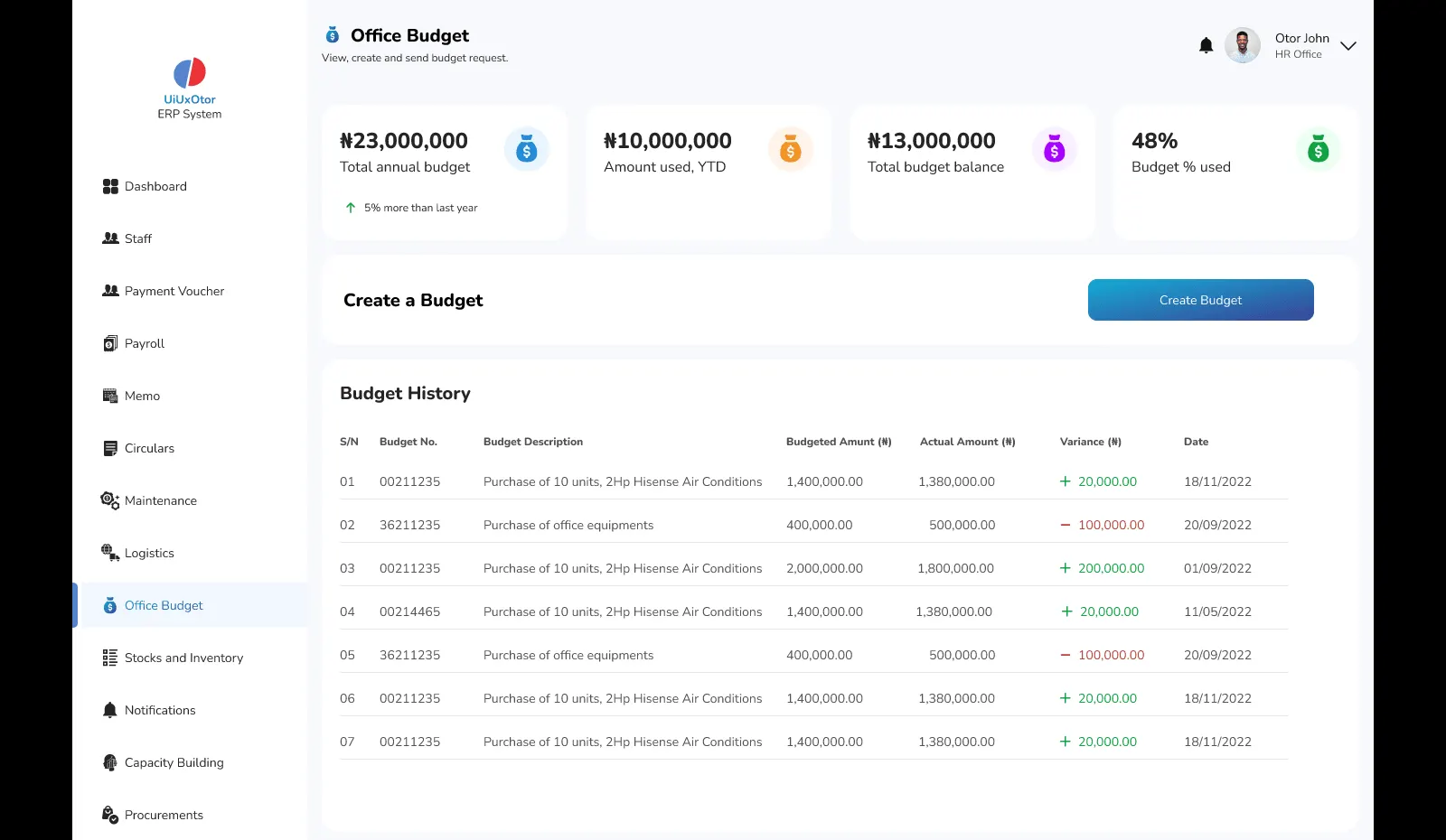
Office budget
Annual budget, spend to date and balance, with budget history that compares budgeted and actual amounts line by line.
- Budget used shown as a percentage
- Variance on every budget line
- Create and route budget requests
Screens from the product prototype. Demo data only.
Screens from the product prototype. Demo data only.
Architecture
What ERPeasy runs on.
The reference architecture we deploy. The crimson application services are where we configure for you; identity, workflow, storage and observability are already built and in production.
Architecture of the ERPeasy. Users: Employees, Approvers, Finance, Administrators. Edge and access: CDN and WAF (CloudFront), Load balancer (ALB, multi-AZ), Identity and SSO (Cognito, SAML). Application services: ERPeasy web app (React), Module services (Node.js), Workflow and approvals (configurable), Document extraction (document AI). Data: Primary database (RDS PostgreSQL), Cache and sessions (ElastiCache Redis). Integrations: Accounting and GL (API), HR and payroll (sync), Logistics (carriers), Email and SMS (SES, SNS). Storage and delivery: Documents (S3), Read replica (reporting load), Static delivery (CloudFront). Reporting: Operational dashboards (by role), Scheduled reports (email), Policy checks (alerts). Observability and security: Alarms and logs (CloudWatch), Audit trail (append-only), Secrets and keys (KMS), Backups (point-in-time).
Team and timeline
4–8 weeks
to your approval flow configured and live
Indicative. Actual duration depends on requirements and complexity, and can change.
Who sets it up
- Solution architect
- Workflow configuration engineer
- Integration engineer
- QA engineer
- Delivery lead
Good to know
The engine and audit trail exist, so the work is your hierarchy, documents and rules. Agreeing the hierarchy, access to your systems and your compliance review set where in the range you land.
Proof
Where this platform has run.

How a leading energy enterprise reduced partner onboarding time by 45%
faster partner onboarding

How a large global financial services company reduced travel processing time by 38%
faster travel processing
FAQ
ERPeasy: common questions.
Does ERPeasy replace our finance ERP?
No. ERPeasy is not a finance ERP and does not replace your general ledger. It runs the operational processes most ERPs leave to email: onboarding, verification, approvals, documents and roles. It sits alongside your existing systems and connects to them through configured integrations, so the ledger stays where it is and the approval record finally has a home.
Which workflow should we configure first?
The one with the most requests and the clearest rules, usually partner onboarding, vendor verification or expense approval. It gives the approval hierarchy and the document set a real workout in the first weeks. Workflows with many exceptions and unwritten rules go later, once the team has seen how configuration and the audit trail behave on something simpler.
What happens when a request fails a compliance check?
It stops at that step. The owner is told which document is missing or which rule failed, and the record shows the stop. Routine checks, such as a document being present and in date or a field matching a reference list, are automated. Exceptions go to a person who can approve them, and that decision is logged against the request with the name of whoever made it.
How does ERPeasy help with audits?
Everything is logged: who submitted, who approved, what the document was at the time, and which rule fired. When an auditor asks for the trail on a request from fourteen months ago, it is one query rather than a search through inboxes and shared drives. Because access follows the role, segregation of duties is something you can show rather than assert.
Who is ERPeasy built for?
Organizations running approvals and compliance through email and spreadsheets at a scale where that has stopped working, typically 500+ employees or 200+ external partners. The same approval engine has run partner onboarding with KYC for a large-scale energy enterprise and business travel requests with policy checks for a large global financial services company.