
ProNinja
EdTech and corporate learning platform
Universities, colleges and training institutes running courses and batches, and corporate learning teams running employee training and internal academies.
How it works
How a learner moves through ProNinja, from enrollment to completion
- Person decides
- Automated
- Course catalog
- Mentors and batches
- Enrollment leads
- Learner skill profiles
- Batch progress
- Enrollment and fee records
Enrollment
Enquiries land in the CRM. An administrator enrolls the learner into a course and batch, or adds employees under a corporate account. The enrollment decision stays with a person.
A person makes this call. The system gives them the context.
Batch and mentor setup
The administrator opens a batch, assigns a mentor and sets the sessions. The class calendar updates for the mentor and for every learner in the batch.
A person makes this call. The system gives them the context.
Classes and sessions
Mentors see ongoing courses, the class calendar and their students in one workspace and run each session from it. Learners see the same schedule on their own calendar.
A person makes this call. The system gives them the context.
Project submissions
Learners submit projects against course milestones. The mentor reviews each submission, and the result feeds the learner's skill score and learning points.
A person makes this call. The system gives them the context.
Progress and scoring
Skill score, learning points and score analysis update automatically as work is reviewed, and batch progress updates on the admin dashboard, so a learner falling behind shows before the course ends.
Rule-based and automatic, logged in the audit trail.
Completion
A completed course is recorded in the learner's experience, and opportunities published by the administrator appear on the learner dashboard.
Rule-based and automatic, logged in the audit trail.
Who it is for
Why universities, colleges and L&D teams look for a different LMS
ProNinja is a learning platform for universities, colleges and training institutes, and for corporate learning teams running employee training and internal academies. Each role gets its own workspace. Administrators manage courses, batches, learners, mentors, opportunities, corporate accounts, CRM, CMS and finance. Mentors, whether faculty or trainers, see ongoing courses, the class calendar, milestones, students and sessions. Learners track skill score, learning points, project submissions and score analysis, with a calendar, community and opportunities alongside. A program is typically configured and live in 2–4 weeks.
It is presented as a product with a live demo, not as a delivery credential. No client case study sits behind it, and we would rather say that plainly than imply an engagement that cannot be named. The demo environment gives you admin, mentor and learner logins on a configured program.
-
Enrollment, fees, content and classes live in separate tools
Leads in one CRM, fees in accounting, content in an LMS and schedules in a spreadsheet mean the same learner is entered again and again.
-
Faculty and trainers work across too many screens
A mentor checks one system for the timetable, another for submissions and a third for student progress.
-
Completion is tracked, skill is not
Many learning platforms record that a module was finished and say little about what the learner can now do.
-
Corporate training is bolted onto an academic system
Company accounts, employee batches and internal academies do not fit a platform designed only around semesters and students.
-
Learners fall behind before anyone notices
When scores and submissions live apart, a struggling learner shows up at the end of the course rather than during it.
-
An open-source LMS is free to download and costly to run
Hosting, plugins, upgrades and the developer who understands the theme become a standing cost.
The platform
What ProNinja gives you.
Modules in production, ready to configure
-
Admin console
Courses, batches, learners and mentors managed in one place, with batch progress and new enrollments on the dashboard.
-
Corporate accounts
Employee training run through corporate accounts, so a company's learners, batches and programs sit together.
-
CRM, CMS and finance
Enrollment leads, course and site content, fees and revenue handled inside the platform rather than in separate tools.
-
Mentor workspace
Ongoing courses, class calendar, milestones, students and sessions for faculty and trainers.
-
Learner dashboard
Skill score, learning points and score analysis, with the score trend over time.
-
Project submissions
Learners submit projects against milestones, and mentors review them from their workspace.
-
Calendar and community
Upcoming classes on each learner's calendar, with a community space alongside the course.
-
Opportunities and experience
Opportunities published by the administrator, and completed learning recorded as experience on the learner profile.
What is different about ProNinja
- 01
A workspace for each role, on one platform
Admin, mentor and learner each get a workspace built for their job, working from the same courses, batches and calendar.
- 02
Operations inside the LMS
CRM, CMS and finance sit alongside courses and batches, so enrollment, content and fees do not need separate tools.
- 03
Academic and corporate learning in one system
Universities, colleges and institutes run courses and batches. Corporate learning teams run the same model through corporate accounts for employee training and academies.
- 04
Skill score, not only completion
Learners see skill score, learning points and score analysis built from reviewed project work, and mentors see who is falling behind while there is still time to help.
- 05
Judged on a demo, not a credential
No client case study sits behind ProNinja, and we say so plainly. You judge it on a demo environment with admin, mentor and learner logins.
Inside the product
ProNinja, screen by screen.
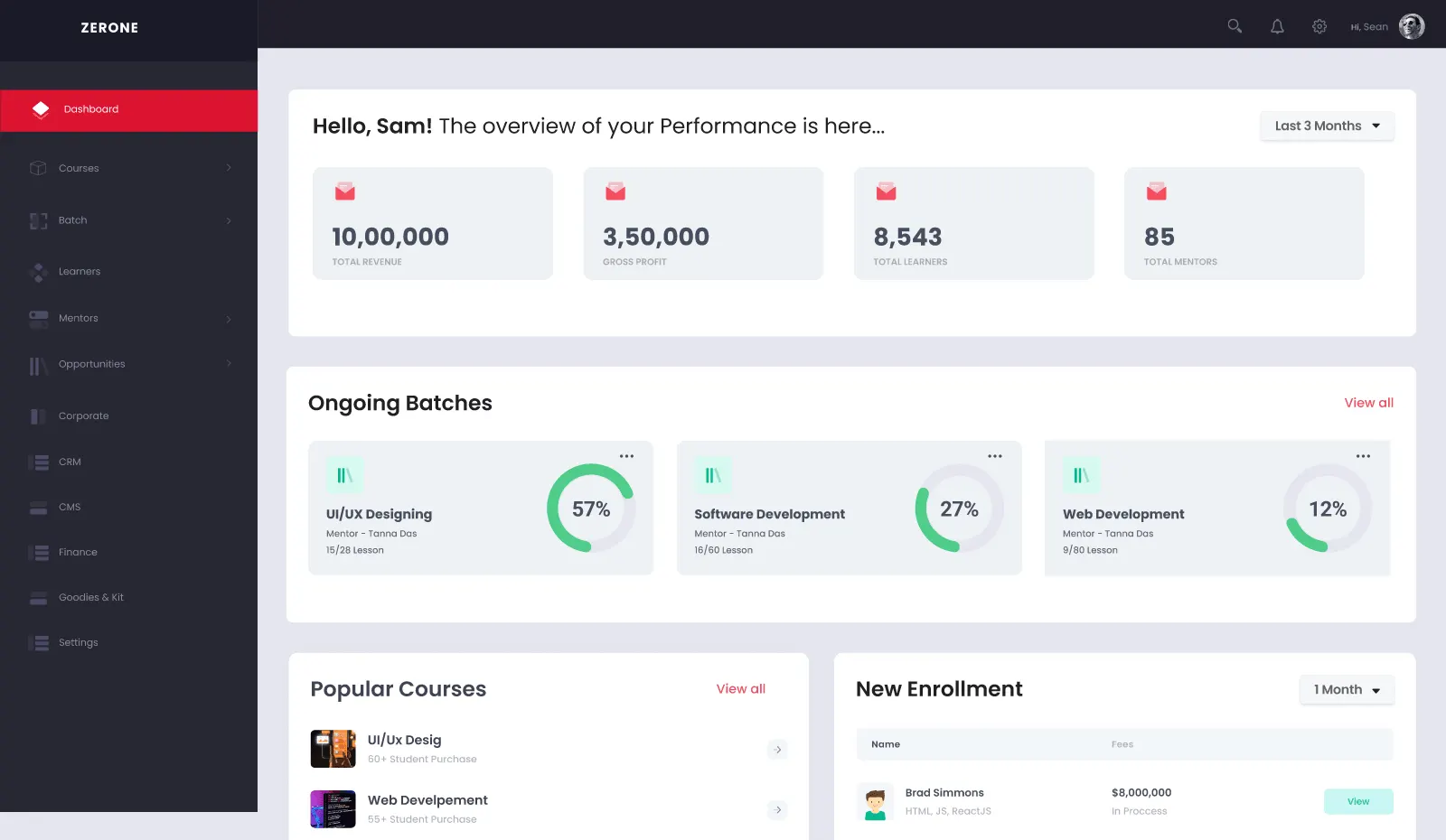
Institution admin dashboard
For universities, colleges and corporate academies: revenue, learners, mentors, ongoing batches, popular courses and new enrollments on one screen.
- Batch progress at a glance
- Enrollments and fees by learner
- Courses, mentors, CRM and finance in one LMS
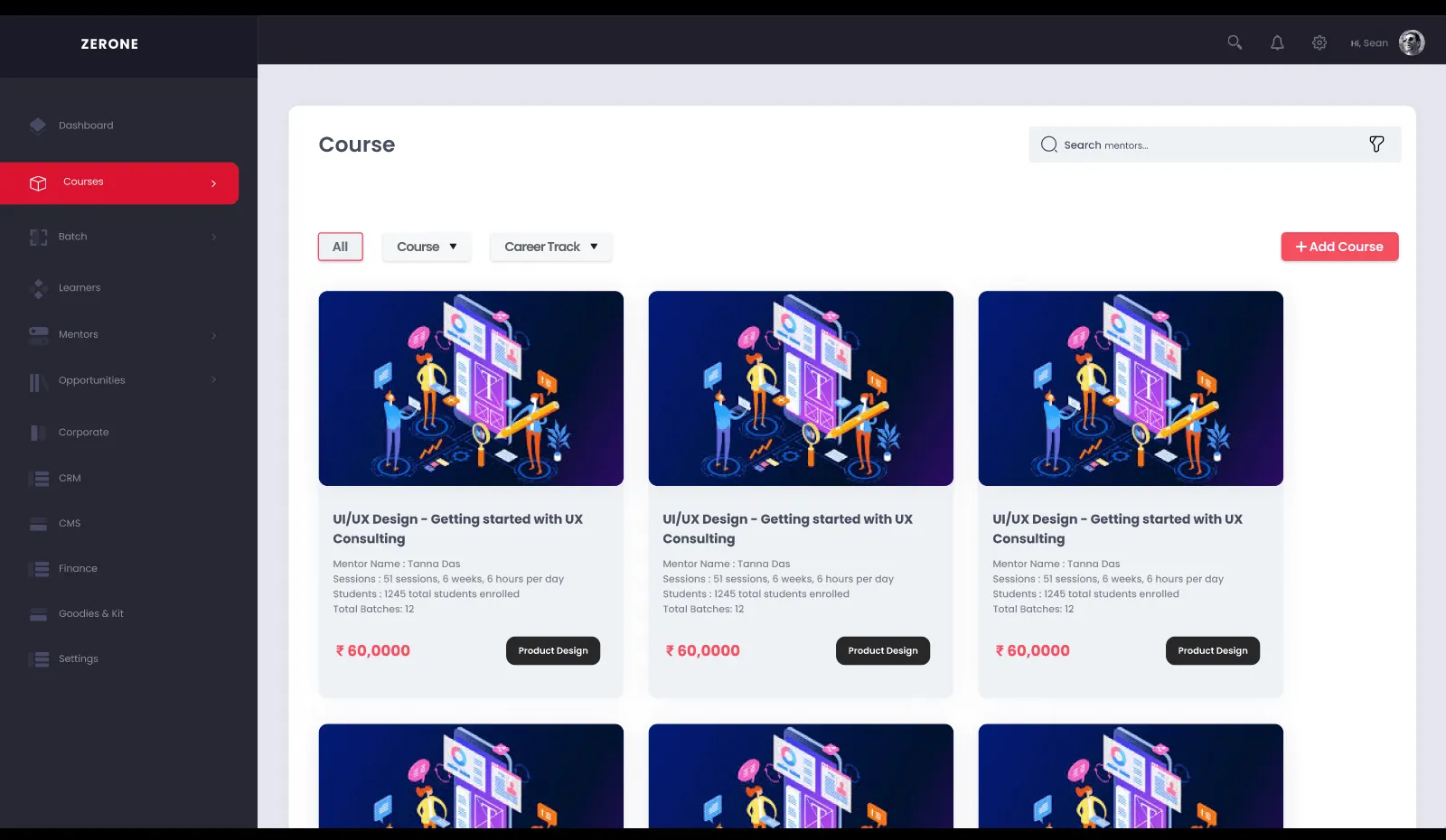
Course catalog
Programs and courses with mentor, sessions, duration and enrollments, filtered by course type or career track, ready to publish.
- Career tracks and course types
- Mentor and session details per course
- Add a course in a few steps
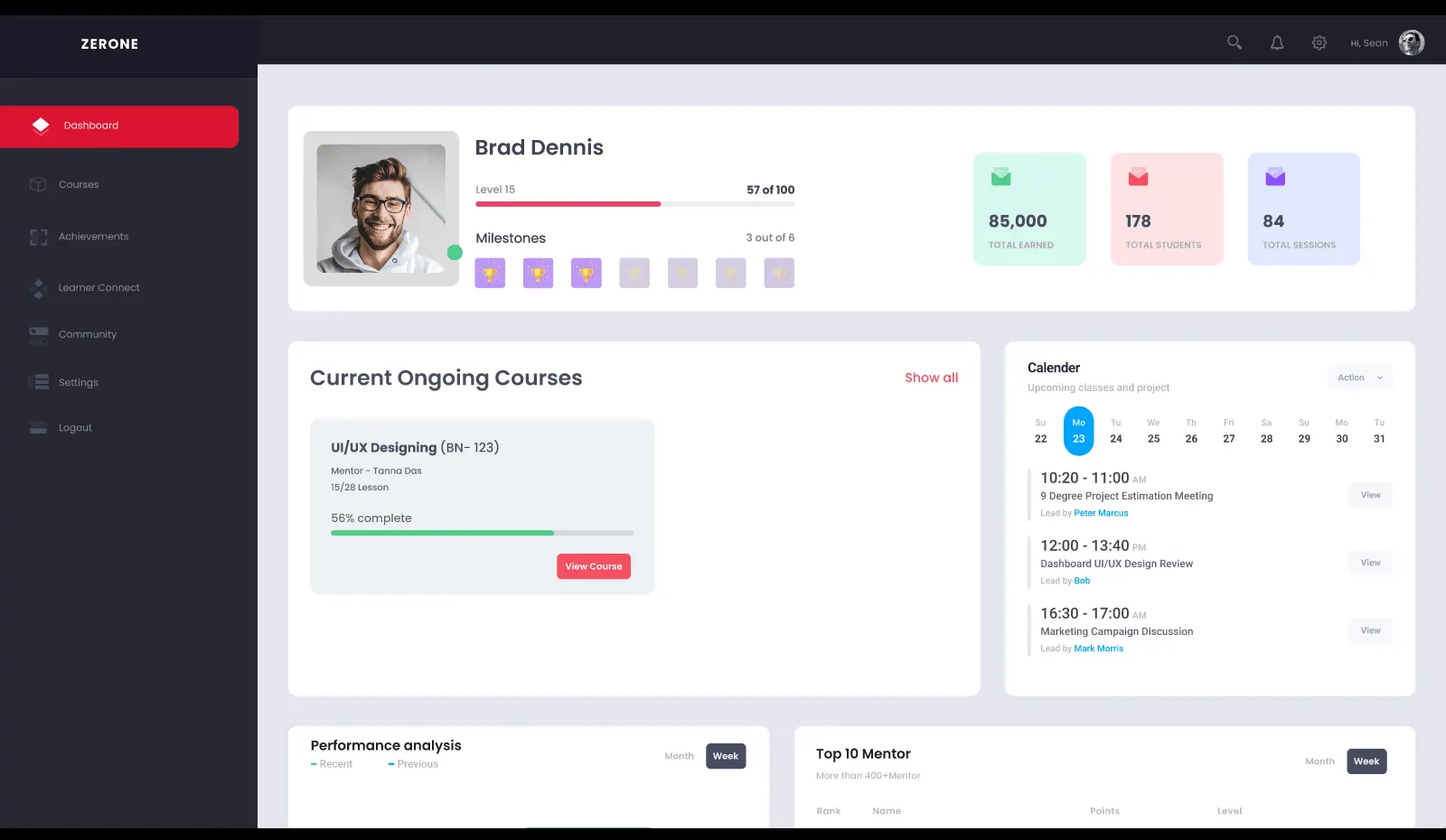
Mentor workspace
Faculty and trainers see their level, milestones, earnings, students and sessions, with ongoing courses and an upcoming class calendar.
- Ongoing courses with completion
- Class calendar and reviews
- Performance and leaderboard
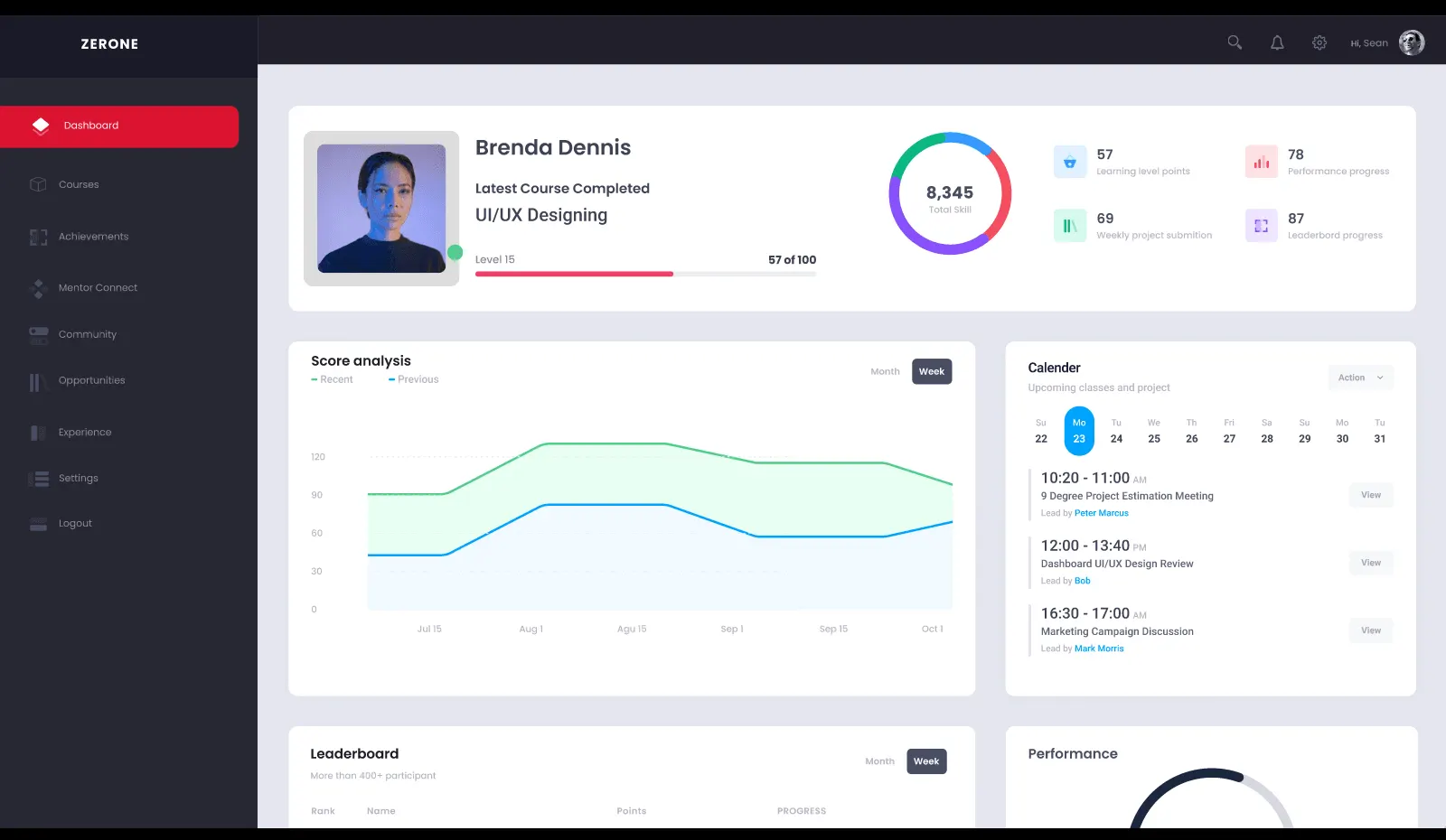
Learner dashboard
Students and employees track skill score, learning points, project submissions and progress, with score analysis and the next classes.
- Skill score and level progress
- Score trend over time
- Calendar, community and opportunities
Screens from the product prototype. Demo data only.
Screens from the product prototype. Demo data only.
Architecture
What ProNinja runs on.
The reference architecture we deploy. The crimson application services are where we configure for you; identity, workflow, storage and observability are already built and in production.
Architecture of the ProNinja learning platform. Users: Learners, Tutors, Administrators. Edge and access: CDN and WAF (CloudFront), Load balancer (ALB, multi-AZ), Identity and SSO (Cognito, SAML). Application services: Learner and tutor apps (React), Course and cohort API (Node.js), Assessment service (peer and tutor grading), Live classes (video). Data: Primary database (RDS PostgreSQL), Cache and sessions (ElastiCache Redis). Integrations: Payments (fees), Email (SES), SMS (SNS), Video conferencing (API). Storage and delivery: Course media (S3), Read replica (reporting load), Static delivery (CloudFront). Analytics: Progress tracking (per learner), Cohort insights (completion), Engagement events (SQS). Observability and security: Alarms and logs (CloudWatch), Audit trail (append-only), Secrets and keys (KMS), Backups (point-in-time).
Team and timeline
2–4 weeks
to your LMS configured and live
Indicative. Actual duration depends on requirements and complexity, and can change.
Who sets it up
- Solution architect
- Platform engineer
- Integration engineer
- QA engineer
- Delivery lead
Good to know
The platform exists, so the work is your course catalog, batches, mentors, corporate accounts and branding. Content readiness and your own review usually set the pace.
FAQ
ProNinja: common questions.
Is there a ProNinja case study?
No. There is no client case study for ProNinja, and we do not present one. What exists is a demo environment with a program configured. If the platform fits, the first engagement becomes the first case study, published under the same rules as every other one on this site: an anonymous descriptor, and figures framed as what platforms of this type do rather than client-confirmed results.
Does ProNinja work for universities and colleges?
Yes. Programs are set up as courses and batches, faculty work as mentors with their own class calendar, milestones, students and sessions, and learners track skill score, learning points and project submissions. Administrators manage courses, learners, mentors, fees and content from one console.
Can ProNinja run as a corporate LMS for employee training?
Yes. Corporate accounts group a company's employees, batches and programs, so an internal academy, or a training provider serving several companies, runs on the same platform. Trainers use the mentor workspace, and employees see their skill score, learning points, calendar and community like any other learner.
What can we try in the demo environment?
You get admin, mentor and learner logins on a configured program. Add a course, open a batch, assign a mentor, submit a project as a learner and review it as the mentor, then watch the skill score and batch progress update. It is the quickest way to judge whether ProNinja fits how your institution or academy runs.
How ready does our course content need to be?
Ready enough to organize into courses, milestones and batches. Material you already have can be brought in as it is. What delays a launch is rarely the platform: it is a course structure or mentor allocation that is still being decided, so settle those first.
How is ProNinja different from an open-source LMS?
An open-source learning management system is free to download and expensive to run: hosting, plugins, upgrades and the developer who understands the theme. ProNinja is configured to your institution or academy, with CRM, CMS and finance built in alongside separate admin, mentor and learner workspaces.